
Turn on IPv6 for your cloud server
Mis à jour le 7 novembre 2026
Every cloud server can get its own IPv6 subnet, a /64, next to its IPv4 address. It's free, and you switch it on in the dashboard.
What you get
- Your subnet: a whole /64, for example
2a13:aa40:1:1::/64. All addresses in it are yours. - Server address: the address your server uses. By default that's the first usable one,
…::1. You can pick another one from your subnet. - Gateway:
fe80::200:5eff:fe00:202. This is a link-local address, so it's the same for every server.
Turn on IPv6
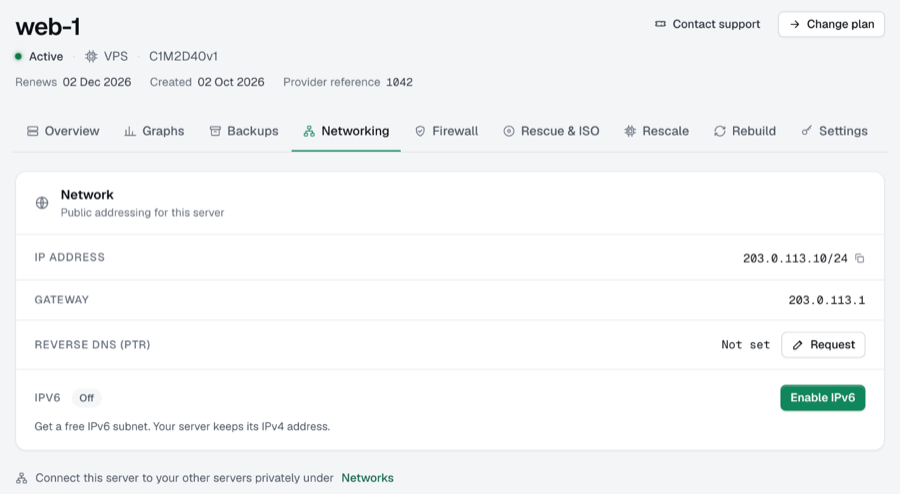
- Open your server in the dashboard and go to the Networking tab.
- Under Network, find IPv6 and click Enable IPv6. You need the owner, admin or billing role for this.
- Your subnet and server address now show up, together with a note that the change takes effect after a restart. Click Restart now, or stop and start the server yourself from the dashboard.
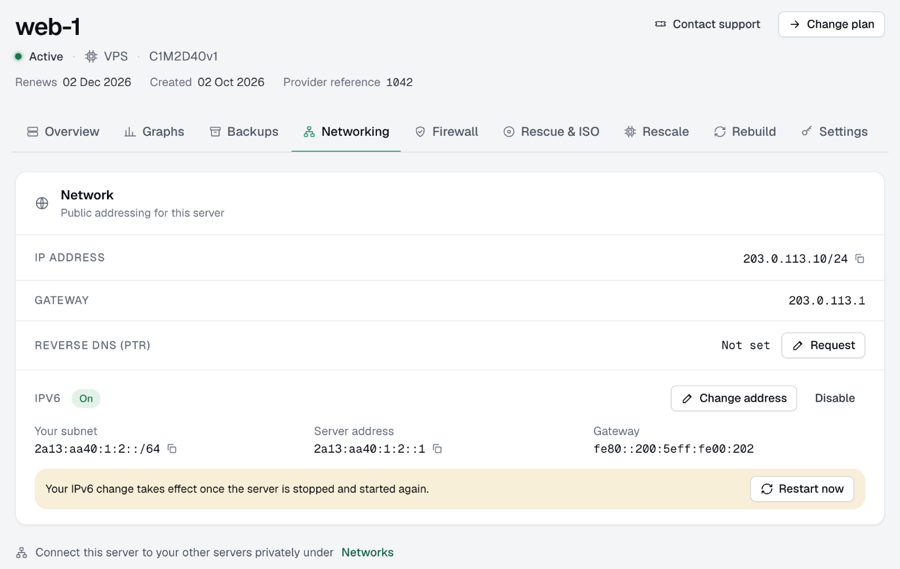
After the restart, the server has its IPv6 address and gateway. Check it from the server:
ip -6 addr show
ping -6 -c 3 2606:4700:4700::1111
A restart from inside the server (sudo reboot) doesn't always pick up the new settings. Use Restart now, or stop and start from the dashboard.
Use it without a restart
If you don't want to restart now, bring the address up by hand. Use your own server address and your network interface (often eth0, check with ip a):
sudo ip -6 addr add YOUR_ADDRESS/64 dev eth0
sudo ip -6 route add default via fe80::200:5eff:fe00:202 dev eth0
This lasts until the next restart. On that restart the dashboard settings take over.
Extra addresses
The whole /64 is yours, so you can add more addresses from it on the server, for example for a second website. Add them with ip -6 addr add as above, and put them in your network configuration (netplan or /etc/network/interfaces) so they come back after a restart. You don't need to tell us.
Change or turn off IPv6
- Change address lets you pick a different address inside your subnet. The first address (
…::) can't be used. - Disable returns the subnet. Your server can't use it anymore, and the old address disappears from its configuration at the next restart.
Both changes take effect after a restart, like enabling.
Good to know
- Your server is reachable over IPv6 as soon as the address is up. Check that your firewall covers IPv6 too.
ufwdoes that by default. - Point a domain at your server over IPv6 with an
AAAArecord that holds your server address. - Servers from our old client area, ordered before 22 November 2024, work differently. See Fix IPv6 on servers from before November 2024.
No IPv6 after a restart? Open a ticket under Support and mention your server's name. We'll take a look.