
Connect your mail app or use webmail
Mis à jour le 3 novembre 2026
You can read your mail in the browser, or add your mailbox to any mail app (Outlook, Apple Mail, Thunderbird, your phone).
Find your settings
In the dashboard, open your web hosting, go to Email and pick your mail domain. The Set up a mail app card shows the exact server name and ports for your mailbox. Each value has a copy button.
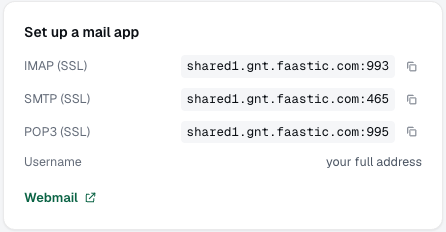
Settings for your mail app
| Server | Port | Security | |
|---|---|---|---|
| Incoming (IMAP) | shown in the card | 993 | SSL/TLS |
| Incoming (POP3) | shown in the card | 995 | SSL/TLS |
| Outgoing (SMTP) | shown in the card | 465 | SSL/TLS |
- Username: your full email address, for example
info@example.com. - Password: the mailbox password.
- Choose IMAP if you read your mail on more than one device. POP3 downloads the mail to one device.
If your app only offers STARTTLS, use port 143 for IMAP and 587 for SMTP.
The server name is usually mail.yourdomain. Until your website has an SSL certificate, the card shows our server's own name instead. Use exactly what the card shows, or your app will warn about the certificate.
Webmail
Click Webmail in the same card to open your mail in the browser, and log in with your full email address and the mailbox password.